



🕯️ Magic Note
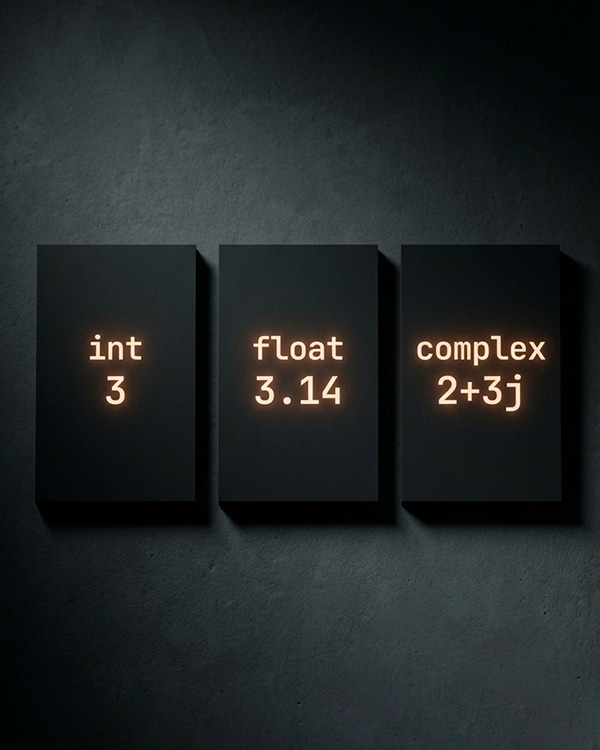
Unlike some languages that force you to declare whether a number is an integer or a decimal, Python is flexible. You can mix integers and floats freely. Python remembers the type for you and converts automatically when needed. This is called “dynamic typing” and it makes Python gentle for beginners.
| Type | What It Is | Example | When to Use |
|---|---|---|---|
| int (Integer) | Whole numbers, no decimal point | -42, 0, 7, 1000 | Counting people, loop indices, ages |
| float (Floating Point) | Decimal numbers, with a decimal point | 3.14, -0.5, 2.0, 1.5e3 | Measurements, prices, percentages, scientific calculations |
| complex | Numbers with a real and imaginary part | 3+4j, 1-2j, -1j | Engineering, physics, signal processing (rare in everyday code) |
Python
# The three number types in action
age = 25 # int
price = 19.99 # float
temperature = -5.5 # float can be negative
complex_num = 3 + 4j # complex (rarely used in basic scripts)
# Check the type of any number
print(type(42)) #
print(type(3.14)) #
- Regular decimal numbers: 42, -7, 1000
- Binary (base 2) with prefix 0b: 0b1010 equals 10 in decimal
- Octal (base 8) with prefix 0o: 0o12 equals 10 in decimal
- Hexadecimal (base 16) with prefix 0x: 0xA equals 10 in decimal
- Underscores for readability: 1_000_000 (same as 1000000)
Python
# Different ways to write integers
regular = 42
binary = 0b1010 # 10 in decimal
octal = 0o12 # 10 in decimal
hexadecimal = 0xA # 10 in decimal
large_number = 1_000_000 # 1000000 (underscores are ignored)
huge = 10 ** 100 # A googol (1 followed by 100 zeros)
print(huge) # Python handles it perfectly
🕯️ Magic Note
The underscore in numbers like 1_000_000 is ignored by Python. It is only for you, the programmer, to make large numbers readable. You can put underscores anywhere except at the start or end.
Python
# Floating point examples
pi = 3.14159
negative_float = -0.5
scientific = 1.5e3 # 1.5 × 10³ = 1500.0
very_small = 1.2e-5 # 0.000012
# Watch out for floating point precision
print(0.1 + 0.2) # 0.30000000000000004 (not 0.3!)
Python
# Complex number examples
z1 = 3 + 4j
z2 = 1 – 2j
z3 = 5j # Real part is 0
# Access real and imaginary parts
print(z1.real) # 3.0
print(z1.imag) # 4.0
print(z1.conjugate()) # 3 – 4j
| Operation | Symbol | Example | Result |
|---|---|---|---|
| Addition | + | 10 + 3 | 13 |
| Subtraction | – | 10 – 3 | 7 |
| Multiplication | * | 10 * 3 | 30 |
| Division | / | 10 / 3 | 3.3333333333333335 (always returns float) |
| Floor Division | // | 10 // 3 | 3 (integer division, rounds down) |
| Modulus (Remainder) | % | 10 % 3 | 1 (remainder after division) |
| Exponentiation (Power) | ** | 10 ** 3 | 1000 (10 to the power of 3) |
Python
# Arithmetic operations in action
a = 10
b = 3
print(a + b) # 13
print(a – b) # 7
print(a * b) # 30
print(a / b) # 3.3333333333333335
print(a // b) # 3
print(a % b) # 1
print(a ** b) # 1000
- Parentheses () – highest priority, evaluated first
- Exponents ** – evaluated next
- Multiplication and Division * / // % – evaluated left to right
- Addition and Subtraction + – – lowest priority, evaluated last
Python
# Order of operations examples
result1 = 10 + 3 * 2 # 10 + (3 × 2) = 16
result2 = (10 + 3) * 2 # (13) × 2 = 26
result3 = 2 ** 3 * 2 # (2³) × 2 = 8 × 2 = 16
result4 = 10 + 3 * 2 ** 2 # 10 + (3 × (2²)) = 10 + (3 × 4) = 22
# When in doubt, add parentheses
safe = (10 + 3) * (2 ** 2) # 13 × 4 = 52
🕯️ Magic Note
Parentheses are never wrong. If you are unsure about the order of operations, add parentheses to make your intention clear. Your future self (and other programmers reading your code) will thank you.
| Function | What It Does | Example | Result |
|---|---|---|---|
| int() | Converts to integer (truncates decimals) | int(3.14) | 3 |
| int() | Converts numeric strings to int | int(“42”) | 42 |
| float() | Converts to float | float(7) | 7.0 |
| float() | Converts numeric strings to float | float(“3.14”) | 3.14 |
| str() | Converts number to string | str(42) | “42” |
Python
# Number conversion examples
float_to_int = int(3.99) # 3 (truncates, does NOT round)
int_to_float = float(42) # 42.0
string_to_int = int(“100”) # 100
string_to_float = float(“3.14”) # 3.14
number_to_string = str(256) # “256”
# Converting from binary, octal, hexadecimal
from_binary = int(“1010”, 2) # 10
from_hex = int(“A”, 16) # 10
| Function | What It Does | Example | Result |
|---|---|---|---|
| abs() | Absolute value (removes negative sign) | abs(-5) | 5 |
| round() | Rounds to nearest integer or decimal | round(3.7), round(3.14159, 2) | 4, 3.14 |
| pow() | Power (same as **) | pow(2, 3) | 8 |
| max() | Largest number in a sequence | max(1, 5, 3) | 5 |
| min() | Smallest number in a sequence | min(1, 5, 3) | 1 |
| sum() | Adds all numbers in a sequence | sum([1, 2, 3]) | 6 |
Python
# Number functions in action
print(abs(-42)) # 42
print(round(3.14159, 2)) # 3.14
print(pow(5, 3)) # 125
print(max(10, 20, 5)) # 20
print(min(10, 20, 5)) # 5
print(sum([8, 12, 5])) # 25
Python
# First import the math module
import math
# Useful constants
print(math.pi) # 3.141592653589793
print(math.e) # 2.718281828459045
print(math.inf) # infinity
print(math.nan) # Not a Number
# Square root
print(math.sqrt(16)) # 4.0
# Ceiling and floor
print(math.ceil(3.2)) # 4 (rounds up)
print(math.floor(3.9)) # 3 (rounds down)
# Trigonometry (angles in radians)
print(math.sin(math.pi / 2)) # 1.0
print(math.cos(0)) # 1.0
print(math.degrees(math.pi)) # 180.0
print(math.radians(180)) # 3.141592653589793
| Operator | Long Form | Short Form | Example (x starts at 10) |
|---|---|---|---|
| += | x = x + 3 | x += 3 | x becomes 13 |
| -= | x = x – 3 | x -= 3 | x becomes 7 |
| *= | x = x * 3 | x *= 3 | x becomes 30 |
| /= | x = x / 3 | x /= 3 | x becomes 3.333 |
| //= | x = x // 3 | x //= 3 | x becomes 3 |
| %= | x = x % 3 | x %= 3 | x becomes 1 |
| **= | x = x ** 3 | x **= 3 | x becomes 1000 |
Python
# Augmented assignment examples
counter = 0
counter += 1 # counter = counter + 1 → 1
counter += 1 # 2
counter *= 3 # 6
balance = 100
balance -= 25 # 75
score = 5
score **= 2 # 25
🕯️ Magic Note
Augmented assignment operators are not just shorter. They can also be slightly faster because Python does not need to look up the variable name twice. For simple counters, counter += 1 is a classic spell used in almost every loop.
Python
# Python handles massive integers effortlessly
googol = 10 ** 100
print(googol) # 1 followed by 100 zeros
factorial_50 = 1
for i in range(1, 51):
factorial_50 *= i
print(factorial_50) # A 65-digit number
# Floats have limits though
print(float(googol)) # inf (infinity – too large for float)
- Forgetting that / always returns a float, even when the result is a whole number like 10 / 2 → 5.0
- Using int() expecting rounding, when it actually truncates int(3.99) → 3
- Comparing floats directly with == instead of checking if the difference is very small
- Forgetting that division by zero causes ZeroDivisionError
- Mixing types in confusing ways (though Python handles most mixing automatically)
- Expecting // to round toward zero (it rounds down for positive numbers but toward negative infinity for negatives)
Python
# Floor division with negative numbers (watch out!)
print(10 // 3) # 3 (rounds down toward negative infinity?) Actually 3.33 rounds down to 3 ✓
print(-10 // 3) # -4 (not -3! Because -3.33 rounds down to -4)
print(10 // -3) # -4 (same reason)
- What is the difference between / and //?
- Why does 0.1 + 0.2 == 0.3 return False?
- What is the value of int(5.99)?
- What is the result of -7 // 3 and why?
- How do you get the remainder when 17 is divided by 5?
- What does 3 ** 4 calculate?
⚡ Whisper
Numbers are the quiet magic beneath every program. They count your loops, measure your data, and decide your paths. An integer holds a whole truth. A float carries a fraction of it. Together they build the mathematics of your code. Handle them with care, and they will never lie to you. Well, except for floats. Floats sometimes whisper sweet nothings that are slightly off. Listen closely.


