



🕯️ Magic Note
Every heart is made from the same idea, but never in exactly the same way. A little randomness. A little geometry. A little code. And suddenly, something unique appears.
- Mathematical heart geometry
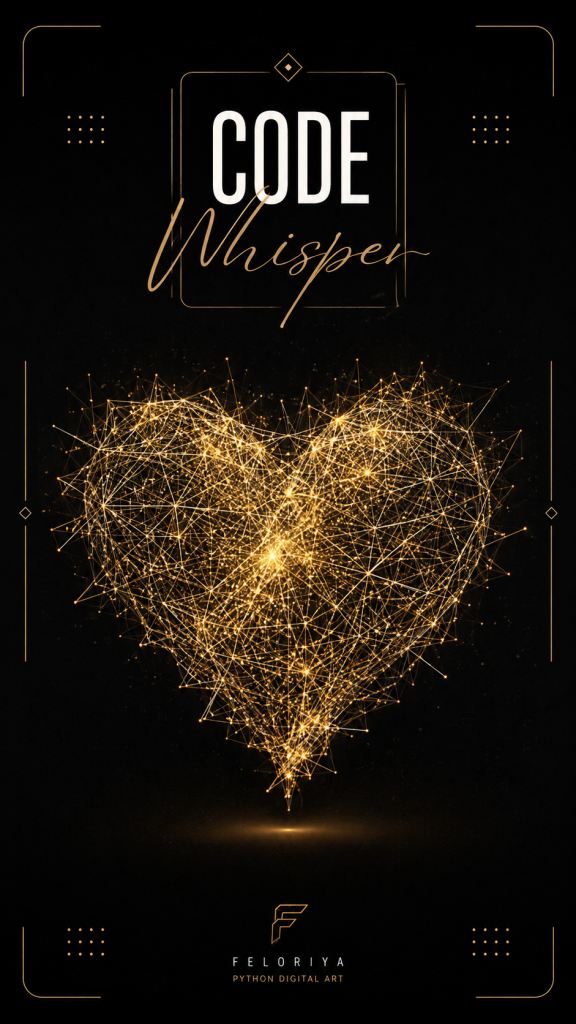
- Thousands of randomly generated points
- Random connections based on distance
- Golden RGB color variations
- Animated construction and fading
- Subtle sinusoidal pulse movement
- A generative heart built entirely with Python
- A Pygame window for real-time rendering
- Thousands of points distributed inside the heart
- Randomized connections between nearby points
- A varied golden palette and line thickness
- A smooth building, resting, flashing, and fading cycle
- A subtle pulse that makes the heart feel alive
🕯️ Magic Note
A mathematical equation can describe much more than numbers. With the right coordinates, an equation becomes a shape. With enough points, the shape becomes a world.
| Element | Role |
|---|---|
| Points | Define the internal structure of the heart |
| Connections | Create the glowing network |
| Distance | Controls which points can connect |
| Probability | Adds randomness to the network |
| Golden palette | Creates the visual identity |
| Line thickness | Adds depth and variation |
- 1. Building: Connections appear progressively until the heart is complete.
- 2. Resting: The completed heart remains visible for a short moment.
- 3. Flashing: A brief increase in brightness highlights the finished structure.
- 4. Fading: The heart gradually becomes transparent before the cycle starts again.
🕯️ Magic Note
The pulse does not need to be dramatic. A tiny movement, repeated at the right rhythm, is enough to make a static shape feel alive.
| Software | Required |
|---|---|
| Python | Yes |
| Pygame | Yes |
| Additional dependencies | pygame |
- 1. Install Python on your computer.
- 2. Install Pygame using pip.
- 3. Create a new Python file.
- 4. Paste the project code into the file.
- 5. Run the Python file.
Python
import pygame
import math
import random
pygame.init()
WIDTH, HEIGHT = 800, 800
screen = pygame.display.set_mode((WIDTH, HEIGHT))
pygame.display.set_caption("EVERY LOVE IS UNIQUE")
clock = pygame.time.Clock()
BLACK = (0, 0, 0)
CENTER = (WIDTH // 2, HEIGHT // 2)
GOLD_WHITE = (255, 252, 238)
GOLD_HIGHLIGHT = (255, 246, 215)
GOLD_LIGHT = (255, 228, 140)
GOLD_LIGHT2 = (250, 210, 90)
GOLD = (235, 185, 55)
GOLD2 = (220, 170, 45)
GOLD_DARK = (185, 140, 35)
GOLD_DARK2 = (160, 120, 30)
GOLD_SHADOW = (125, 92, 28)
GOLD_SHADOW2 = (105, 78, 22)
GOLD_PALETTE = [
GOLD_WHITE, GOLD_HIGHLIGHT, GOLD_LIGHT, GOLD_LIGHT2, GOLD,
GOLD2, GOLD_DARK, GOLD_DARK2, GOLD_SHADOW, GOLD_SHADOW2
]
def is_inside_heart(x, y):
x_norm, y_norm = x / 16, y / 13
return (x_norm**2 + y_norm**2 - 1)**3 - x_norm**2 * y_norm**3 <= 0
def generate_heart_point():
while True:
x, y = random.uniform(-16, 16), random.uniform(-14, 14)
if is_inside_heart(x, y):
rand = random.random()
if rand < 0.50:
scale = random.uniform(0.92, 1.0)
elif rand < 0.75:
scale = random.uniform(0.7, 0.92)
elif rand < 0.90:
scale = random.uniform(0.4, 0.7)
else:
scale = random.uniform(0.1, 0.4)
if y > 2 and random.random() < 0.45:
if x > 0:
x = x * random.uniform(0.8, 0.95) + random.uniform(2, 4)
else:
x = x * random.uniform(0.8, 0.95) - random.uniform(2, 4)
scale *= random.uniform(0.8, 0.9)
if y < -6 and random.random() < 0.35:
scale *= random.uniform(0.92, 1.0)
x *= random.uniform(0.85, 0.95)
return x * scale, y * scale
points = []
num_points = 5500
for _ in range(num_points):
x, y = generate_heart_point()
px = CENTER[0] + x * 18 + random.uniform(-0.8, 0.8)
py = CENTER[1] - y * 18 + random.uniform(-0.8, 0.8)
points.append((px, py))
for t in range(350):
t_angle = (t / 350) * 2 * math.pi
x = 16 * math.sin(t_angle) ** 3
y = 13 * math.cos(t_angle) - 5 * math.cos(2 * t_angle) - 2 * math.cos(3 * t_angle) - math.cos(4 * t_angle)
noise_x, noise_y = random.uniform(-3, 3), random.uniform(-3, 3)
if y > 2:
noise_x, noise_y = random.uniform(-4, 4), random.uniform(-2, 2)
elif y < -6:
noise_x, noise_y = random.uniform(-1.5, 1.5), random.uniform(-1.5, 1.5)
px = CENTER[0] + x * 18 + noise_x
py = CENTER[1] - y * 18 + noise_y
points.append((px, py))
for _ in range(250):
x, y = random.uniform(-11, -3), random.uniform(3, 10)
if is_inside_heart(x, y):
px = CENTER[0] + x * 18 + random.uniform(-2, 2)
py = CENTER[1] - y * 18 + random.uniform(-1.5, 1.5)
points.append((px, py))
x, y = random.uniform(3, 11), random.uniform(3, 10)
if is_inside_heart(x, y):
px = CENTER[0] + x * 18 + random.uniform(-2, 2)
py = CENTER[1] - y * 18 + random.uniform(-1.5, 1.5)
points.append((px, py))
for _ in range(80):
x, y = random.uniform(-3, 3), random.uniform(6, 10)
if is_inside_heart(x, y):
px = CENTER[0] + x * 18 + random.uniform(-1, 1)
py = CENTER[1] - y * 18 + random.uniform(-2, 2)
points.append((px, py))
for _ in range(400):
x, y = random.uniform(-3.5, 3.5), random.uniform(-14, -7)
if is_inside_heart(x, y):
px = CENTER[0] + x * 18 + random.uniform(-0.4, 0.4)
py = CENTER[1] - y * 18 + random.uniform(-0.4, 0.4)
points.append((px, py))
for _ in range(150):
x, y = random.uniform(-1.2, 1.2), random.uniform(-14.8, -11.5)
if is_inside_heart(x, y):
px = CENTER[0] + x * 18 + random.uniform(-0.2, 0.2)
py = CENTER[1] - y * 18 + random.uniform(-0.2, 0.2)
points.append((px, py))
for _ in range(60):
x, y = random.uniform(-0.8, 0.8), random.uniform(-15, -13)
if is_inside_heart(x, y):
px = CENTER[0] + x * 18 + random.uniform(-0.1, 0.1)
py = CENTER[1] - y * 18 + random.uniform(-0.1, 0.1)
points.append((px, py))
lines = []
line_properties = []
max_attempts = 45000
attempts = 0
while len(lines) < 10000 and attempts < max_attempts:
attempts += 1
a, b = random.randrange(len(points)), random.randrange(len(points))
if a == b:
continue
x1, y1 = points[a]
x2, y2 = points[b]
d = math.hypot(x1 - x2, y1 - y2)
if d < 5:
continue
if d < 35 and random.random() < 0.35:
pass
elif d < 65 and random.random() < 0.40:
pass
elif d < 100 and random.random() < 0.25:
pass
else:
continue
lines.append((a, b))
color = random.choices(
GOLD_PALETTE,
weights=[10, 5, 15, 10, 20, 15, 10, 5, 5, 5],
k=1
)[0]
thickness = random.choices(
[1, 1, 2, 2, 3],
weights=[0.35, 0.30, 0.20, 0.10, 0.05]
)[0]
line_properties.append({'color': color, 'thickness': thickness})
progress = 0
phase = 'building'
flash_timer = 0
rest_timer = 0
fade_timer = 0
brightness_boost = 0
line_alpha = 1.0
running = True
try:
while running:
for event in pygame.event.get():
if event.type == pygame.QUIT:
running = False
if event.type == pygame.KEYDOWN:
if event.key == pygame.K_ESCAPE:
running = False
if event.key == pygame.K_r:
progress = 0
phase = 'building'
flash_timer = 0
rest_timer = 0
fade_timer = 0
brightness_boost = 0
line_alpha = 1.0
screen.fill(BLACK)
time_ms = pygame.time.get_ticks()
beat = 1 + 0.025 * math.sin(time_ms * 0.0038)
if phase == 'building':
progress += 12
if progress >= len(lines):
progress = len(lines)
phase = 'resting'
rest_timer = 0
line_alpha = 1.0
elif phase == 'resting':
rest_timer += 1
if rest_timer > 120:
phase = 'flashing'
flash_timer = 0
elif phase == 'flashing':
flash_timer += 1
if flash_timer < 15:
brightness_boost = 0.4 * (1 - flash_timer / 15)
else:
brightness_boost = 0
phase = 'fading'
fade_timer = 0
elif phase == 'fading':
fade_timer += 1
if fade_timer < 60:
line_alpha = 1.0 - fade_timer / 60
else:
line_alpha = 0
progress = 0
phase = 'building'
line_alpha = 1.0
brightness_boost = 0
draw_count = min(progress, len(lines))
for i in range(draw_count):
a, b = lines[i]
props = line_properties[i]
x1, y1 = points[a]
x2, y2 = points[b]
individual_beat = 1 + 0.012 * math.sin(
time_ms * 0.0038 + i * 0.001
)
current_beat = beat * individual_beat
cx1 = CENTER[0] + (x1 - CENTER[0]) * current_beat
cy1 = CENTER[1] + (y1 - CENTER[1]) * current_beat
cx2 = CENTER[0] + (x2 - CENTER[0]) * current_beat
cy2 = CENTER[1] + (y2 - CENTER[1]) * current_beat
flash_brightness = 1 + brightness_boost
beat_brightness = 0.9 + 0.15 * (current_beat - 0.975) * 8
total_brightness = flash_brightness * beat_brightness * line_alpha
r, g, b = props['color']
r = min(255, max(30, int(r * total_brightness)))
g = min(255, max(30, int(g * total_brightness)))
b = min(255, max(30, int(b * total_brightness)))
if props['thickness'] == 1:
pygame.draw.aaline(
screen, (r, g, b), (cx1, cy1), (cx2, cy2)
)
else:
pygame.draw.line(
screen,
(r, g, b),
(cx1, cy1),
(cx2, cy2),
props['thickness']
)
if phase == 'building':
glow = progress - 130
if 0 < glow < draw_count and line_alpha > 0.1:
glow_radius = 55
for i in range(
max(0, glow - glow_radius),
min(draw_count, glow + glow_radius)
):
a, b = lines[i]
x1, y1 = points[a]
x2, y2 = points[b]
current_beat = beat
cx1 = CENTER[0] + (x1 - CENTER[0]) * current_beat
cy1 = CENTER[1] + (y1 - CENTER[1]) * current_beat
cx2 = CENTER[0] + (x2 - CENTER[0]) * current_beat
cy2 = CENTER[1] + (y2 - CENTER[1]) * current_beat
distance = abs(i - glow)
alpha = max(
0,
int(200 * (1 - distance / glow_radius) * line_alpha)
)
if alpha > 0:
if alpha > 150:
glow_color = (255, 252, 238)
elif alpha > 80:
glow_color = (255, 248, 225)
else:
glow_color = (255, 240, 200)
glow_width = (
3 if alpha > 150
else 2 if alpha > 80
else 1
)
pygame.draw.line(
screen,
glow_color,
(cx1, cy1),
(cx2, cy2),
glow_width
)
pygame.display.flip()
clock.tick(60)
finally:
pygame.quit()
- Increase or decrease the number of points
- Change the number of possible connections
- Adjust the heart scale
- Create your own golden color palette
- Change the line thickness
- Make the pulse faster or slower
- Change the building speed
- Increase or decrease the resting duration
- Experiment with flashing intensity
- Change the fading speed
🕯️ Magic Note
Do not try to make every version perfect. Change one rule. Run it again. Watch what happens. Generative art becomes interesting when you stop controlling every detail.
- Working with mathematical shapes
- Generating points with randomness
- Filtering coordinates using mathematical conditions
- Connecting objects based on distance
- Using probability to control visual behavior
- Working with RGB colors
- Creating animation with time and sine waves
- Managing multiple animation states
- Building generative visuals with Python
- Turning simple rules into complex visual results
⚡ Whisper
Code does not always need to solve a practical problem. Sometimes, it can simply create something that makes you stop and look. This heart is only geometry, randomness, color, motion, and a few simple rules. But when those rules work together, something unexpected appears. That is one of the beautiful things about creative coding. You write the rules. The computer creates the variation. And somewhere between the two, something unique begins to exist.


